P
Loading blog...
Loading blog...
ODK is the foundation that most mobile data collection tools are built on. Understanding it makes you a better user of everything built from it.
Ravi Menon
Apr 09, 2026•4 min read
If you have used KoboToolbox or SurveyCTO for field data collection, you have been using ODK whether you knew it or not. Both platforms are built on the Open Data Kit framework: they use ODK's XLSForm standard to build forms, ODK's data model to structure submissions, and ODK's offline collection logic to handle low-connectivity environments.
Most field researchers never need to interact with ODK directly. But understanding what it is, what it does, and when to use it on its own rather than through a derived platform makes you a more capable and informed researcher.
Open Data Kit is an open-source set of tools developed at the University of Washington that enables the collection, management, and analysis of data in offline or low-connectivity environments. The core components are: ODK Collect (the Android app used by field enumerators to complete surveys), ODK Central (the server where forms are hosted and submissions are stored), and the XLSForm standard (the Excel-based form authoring format shared across ODK, KoboToolbox, SurveyCTO, and other ODK-compatible platforms).
ODK is maintained by Get ODK (getodk.org), a nonprofit organization, and is free to use. The community around ODK is large, and the ODK documentation is among the most comprehensive in the open-source data collection space.
All three platforms use the same XLSForm standard and share core functionality. The differences are in user interface, additional features, hosting infrastructure, and pricing:
Raw ODK with no additional wrapper. Technically powerful, minimal interface. Requires self-hosting or use of Get ODK's managed cloud hosting. Best suited for technical users, academic researchers, and organizations that need full control over their data infrastructure. No form builder GUI — forms must be built in XLSForm.
Built on ODK with a significant user experience layer added. Includes a visual drag-and-drop form builder, built-in data dashboards, report generation, and team collaboration features. Free for most users (with storage limits). The most accessible entry point for researchers new to digital data collection. Hosted on shared servers managed by the Harvard Humanitarian Initiative or a dedicated EU server.
Also built on ODK, with the most advanced feature set of the three. Includes CATI integration, audio auditing, sophisticated case management, and deeper server-side monitoring. Subscription-based. The preferred platform for large-scale, longitudinal, or high-stakes research programs where data quality controls are a primary concern.
If you know XLSForm, you can work with any of these platforms. The form you build in one will work in all three, with minor differences.
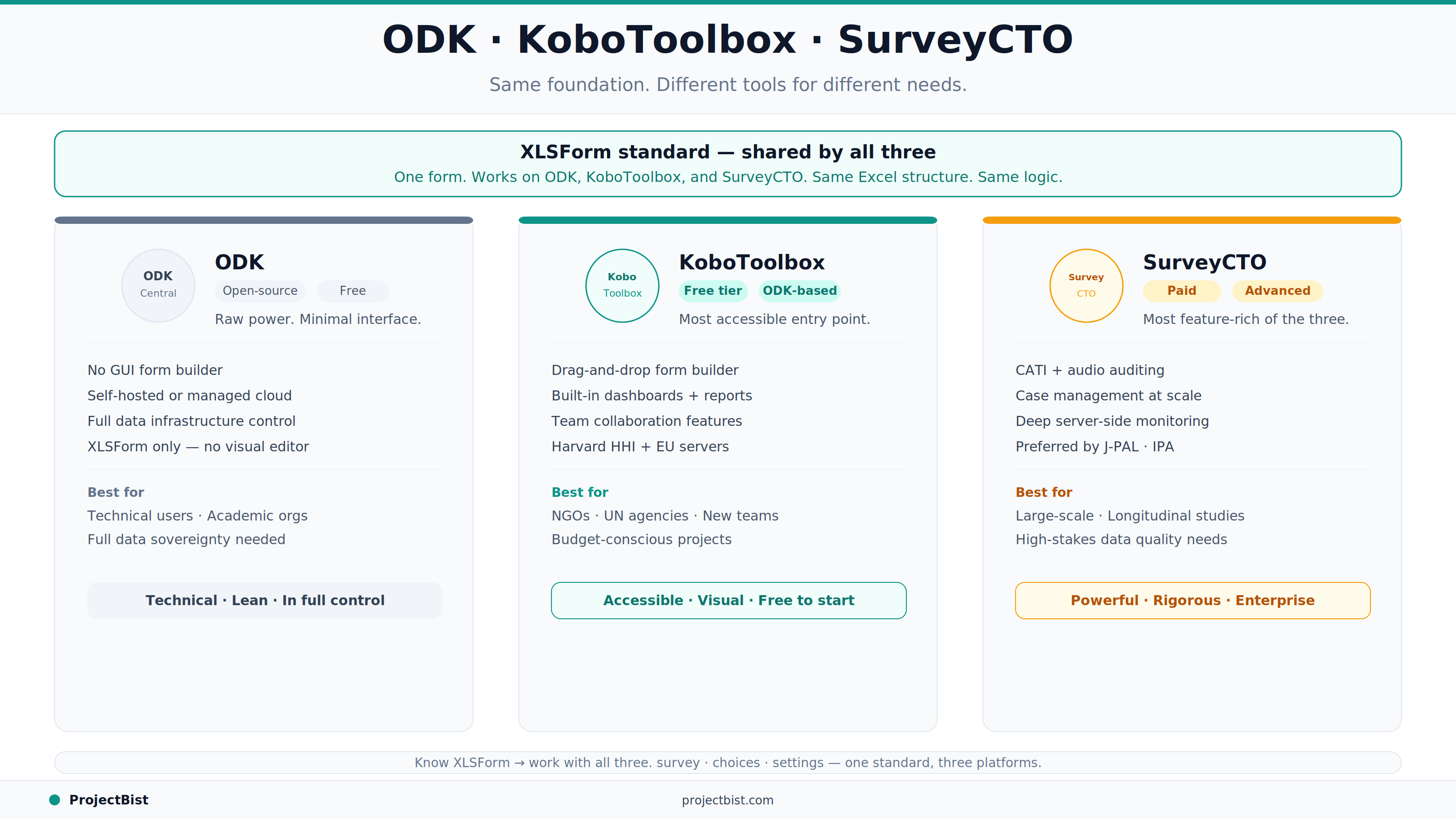
XLSForm is the common language. A form authored as an Excel spreadsheet with three worksheets — survey (all questions), choices (response options for select questions), and settings (form metadata) — can be uploaded to ODK, KoboToolbox, or SurveyCTO and will behave consistently across all three. This portability is the key reason XLSForm knowledge is one of the most transferable technical skills in field research.
For most applied researchers, KoboToolbox is the right starting point. It provides all the core ODK functionality with a significantly better user experience, a free tier that covers most project needs, and strong community support. If you are building your first digital field research project and do not have a specific technical reason to use raw ODK, start with KoboToolbox.
Is ODK really free?
ODK Collect (the Android app) is free. ODK Central (the server) is open-source and free to host yourself, or available as a managed hosting service through Get ODK for a fee. KoboToolbox, which is built on ODK, is free for most users with storage limits.
Can I use an XLSForm built for KoboToolbox in SurveyCTO?
Yes, with minor adjustments. The core XLSForm structure is compatible across all ODK-based platforms. Some platform-specific features like SurveyCTO's plug-ins or KoboToolbox's media gallery functions may not transfer directly, but standard form logic and question types are compatible.
Does ODK work without internet?
Yes. ODK Collect is specifically designed for offline data collection. Forms are downloaded to the device before fieldwork. Completed submissions are stored locally and synced when the device has a connection. This is one of ODK's core strengths for research in remote or low-connectivity settings.
Newsletter
Personalize your updates! Subscribe to ProjectBist's Newsletter and choose from the following categories.
Ethnographic Research: How to Study Culture and Community by Being Present in Ways Other Methods Cannot
Survey Translation and Back-Translation: How to Ensure Your Instrument Means the Same Thing in Every Language
How to Build a Research Firm From Scratch: What the First Three Years Actually Require