P
Loading blog...
Loading blog...
One of the most widely used data collection tools in the world. Here is how to get started and avoid the most common setup mistakes.
Ravi Menon
Apr 02, 2026•4 min read
If you have been collecting field data on paper forms and then manually entering it into spreadsheets, there is a better way. And it is free.
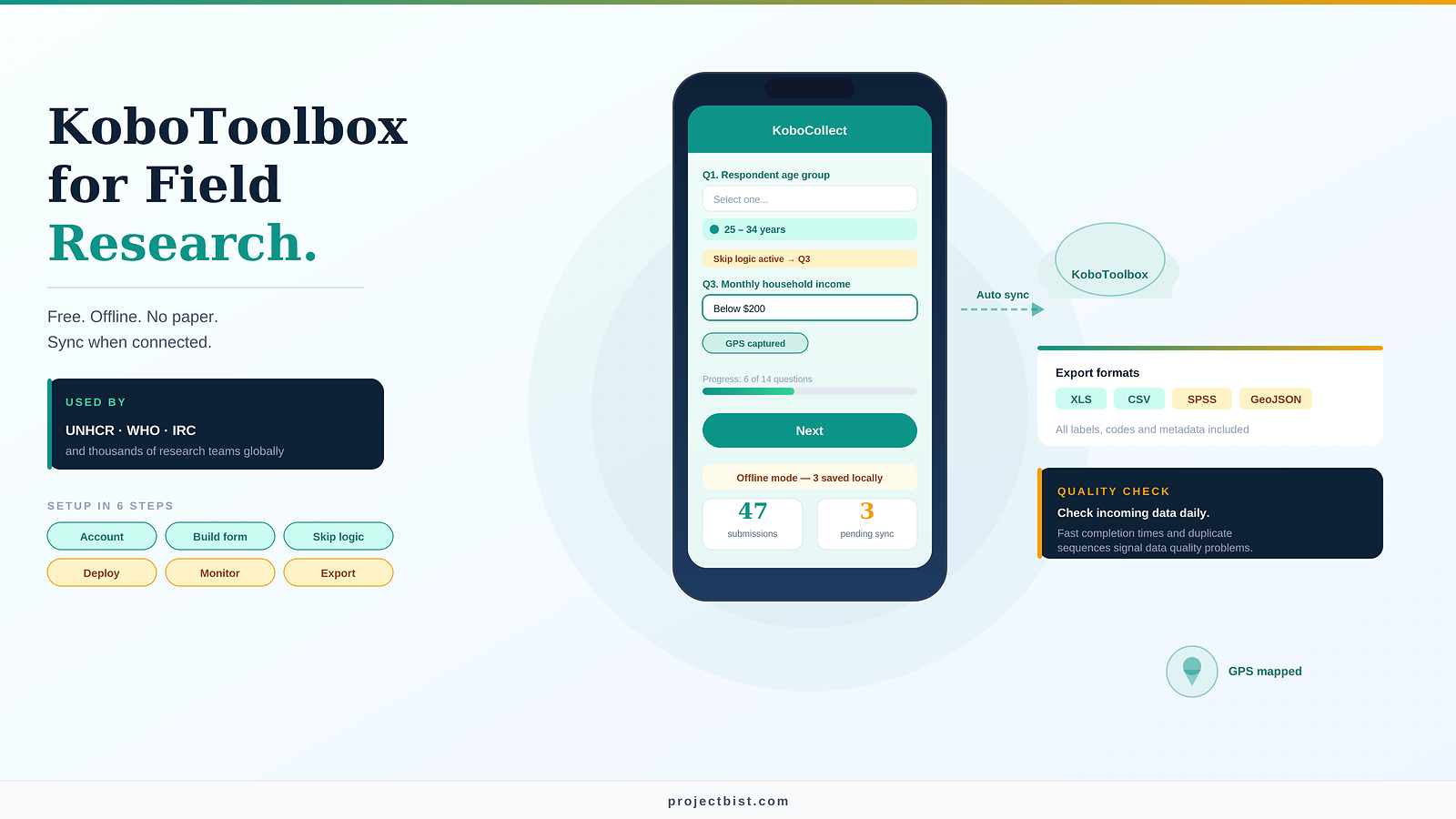
KoboToolbox is an open-source platform used by UNHCR, WHO, IRC, and thousands of research teams globally to design, deploy, and manage digital data collection. It works offline, syncs automatically when connectivity returns, and eliminates the data entry step entirely. This guide will get you set up and collecting data correctly from day one.
Go to kobotoolbox.org and click Get started for free. You will be offered two server options:
Activate your account via the confirmation email. Once logged in, you will land on the main project dashboard.
Click NEW to start a project. Select Build from scratch. You will see the Formbuilder, which is KoboToolbox's drag-and-drop form editor.
A form that has not been tested before deployment is a form that will have problems in the field. Always pilot first.
Skip logic is what makes your form intelligent. Instead of showing every question to every respondent, the form routes respondents to relevant questions based on their previous answers.
In the Formbuilder, click Settings on any question. Under Skip logic, define the condition: for example, show this question only if Q3 = 'Yes'. This reduces respondent burden and eliminates the enumerator error of accidentally skipping questions that should have been shown.
Once your form is ready, click DEPLOY in the Form tab. This makes the form live and generates a collection link.
For field teams using Android devices, download the KoboCollect app from the Google Play Store. Configure it with your server URL (kf.kobotoolbox.org for the Global server) and your account credentials. The form will appear in the app and can be downloaded to each device for offline use.
Enumerators fill out the form on their devices. Completed interviews are stored locally until the device connects to the internet, at which point they sync automatically to your KoboToolbox account.
Once data is coming in, you can monitor it in real time from the DATA tab of your project. This shows you:
Check incoming data daily during fieldwork. Patterns like identical response sequences, implausibly fast completion times, or GPS coordinates that do not match the survey area are early indicators of data quality problems.
When fieldwork is complete, go to the DATA tab and click Downloads. You can export in XLS, CSV, GeoJSON, SPSS, or other formats depending on your analysis software. Choose XLS or CSV for Excel and standard statistical software. All question labels, response codes, and metadata are included in the export.
If your form is complex, using XLSForm is more efficient than the Formbuilder. XLSForm is a standard that lets you build forms in Microsoft Excel or Google Sheets and upload them to KoboToolbox. You work with three sheets: survey (all questions), choices (response options), and settings. More advanced logic, calculations, repeat groups, and cascading selects are all much easier to implement in XLSForm than in the graphical Formbuilder.
KoboToolbox removes the most expensive and error-prone step of field research: manual data entry. Getting your team set up correctly from the start, with a properly tested form and a clear monitoring protocol, is the single highest-return investment you can make in any field data collection project.
ProjectBist profiles show the specific tools each researcher has worked with.
Search KoboToolbox Specialistsarrow_forwardSources: KoboToolbox official documentation (support.kobotoolbox.org); GEO-LDN KoboToolbox Application Guide; Arqaam KoboToolbox Overview; ResearchGate — Data Collection with KoboToolbox (2019)
Newsletter
Personalize your updates! Subscribe to ProjectBist's Newsletter and choose from the following categories.
Ethnographic Research: How to Study Culture and Community by Being Present in Ways Other Methods Cannot
Survey Translation and Back-Translation: How to Ensure Your Instrument Means the Same Thing in Every Language
How to Build a Research Firm From Scratch: What the First Three Years Actually Require